
Table of Contents
Toggle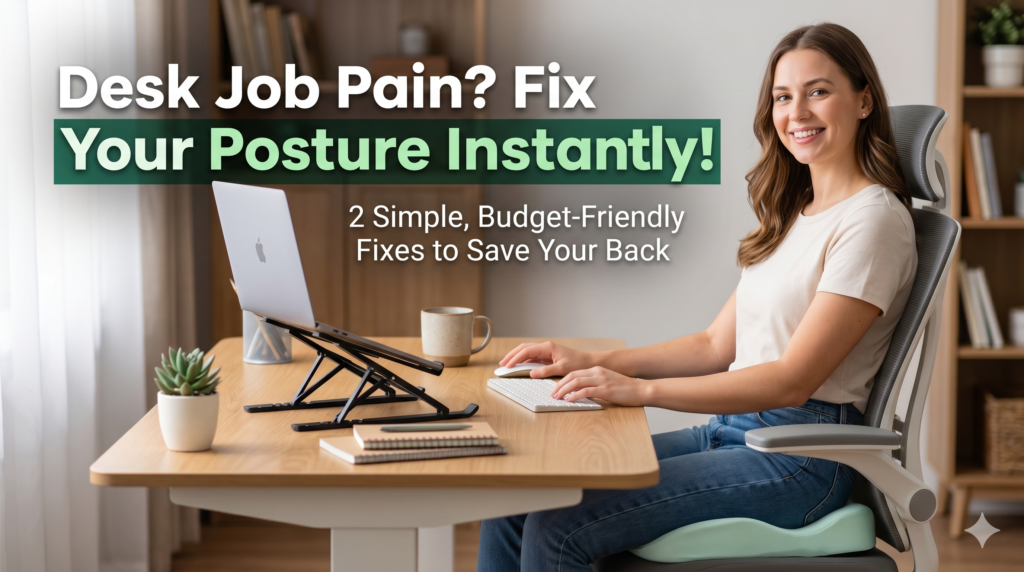
If you’re trying to figure out how to fix posture at desk
setups without spending a fortune— you’re in the right place. I was in the exact same spot a few months ago, waking up everymorning with a stiff neck and a lower back that felt 20 years older than the rest of me.
Here’s what nobody tells you: bad desk posture isn’t laziness. It’s geometry. Your chair isflat, your screen is too low, and you’re sitting in the same position for hours without a break.Your body was never designed for that. No wonder it’s fighting back.
The good news? You don’t need a $1,500 Herman Miller chair or a full office renovation.Two smart adjustments fixed 90% of my pain — and I found both on Amazon for under$100 combined. I’ll walk you through the full setup in this guide, including exactly how tosit, what to do every hour, and which products are actually worth buying.
What Does “Good Posture at a Desk” Actually Look Like?
Let’s be real — most of us picture good posture as sitting bolt upright like a statue. That’snot it. Holding yourself rigid is exhausting and causes its own kind of tension. Real goodposture is effortless. It means your spine is in its natural S-curve shape, not forced into it.
Here’s what you’re aiming for, from head to toe:
Head:
Your ears sit directly over your shoulders. Eyes level with the top third of yourscreen.
Shoulders:
Relaxed and dropped — not creeping up toward your ears.
Lower back:
A gentle inward curve, supported by your chair or a cushion. Notrounded outward.
Arms:
Elbows bent around 90 degrees, wrists flat and relaxed on the keyboard.
Hips:
Sitting all the way back in your seat, thighs roughly parallel to the floor.
Feet:
Flat on the floor. Not dangling, not tucked underneath you.
Most people are failing on at least three or four of these at the same time — which is exactlywhy the pain compounds so quickly throughout the day.
How to Sit Correctly at a Desk: 5-Point Setup Checklist
Before you buy anything, get your workstation geometry right. This costs nothing and you’ll feel a difference today.
1. Get Your Chair Height Right First
Your feet need to rest flat on the floor with your knees at a 90-degree angle. Too high and your feet dangle, killing your lumbar support. Too low and your knees rise above your hips,which tilts your pelvis forward and crunches your lower spine.
Quick test:
Sit all the way back. Can your feet rest flat without reaching? If not, raise thechair or use a footrest.
2. Raise Your Monitor to Eye Level
The top of your screen should sit at or just slightly below your eye line, about an arm’slength away. Looking down at a laptop all day is one of the fastest ways to destroy your neck— more on that below.
3. Pull Your Keyboard and Mouse Closer
Your elbows should stay near your body — not reaching forward or out to the sides. Everytime you reach, your shoulders pull forward and slowly round over the course of the day.Bring everything closer than you think you need to.
4. Fill the Gap in Your Lower Back
Reach behind you and feel the space between your lower back and your chair. If there’s agap — and there almost always is — your lumbar spine is floating unsupported. A seatcushion or lumbar pillow closes that gap and keeps your spine in a natural curve.
5. Tuck Your Chin, Don’t Crane It
Your chin should be lightly tucked back — not jutting forward toward the screen. If youkeep catching yourself leaning in to read, either increase your font size or move the monitorcloser. Craning forward even 2–3 inches puts serious load on your neck muscles over hoursof use.
The 2 Root Causes of Bad Desk Posture (And the Exact Amazon Fixes)
After months of trial and error working from home, I realized almost every desk postureproblem traces back to two things. Fix these, and the rest sorts itself out.
The 2 Root Causes of Bad Desk Posture (And the Exact Amazon Fixes)
After months of trial and error working from home, I realized almost every desk postureproblem traces back to two things. Fix these, and the rest sorts itself out.
Problem 1: Your Chair Is Giving Your Back Zero Support
Most chairs — including most “office chairs” — are completely flat underneath. That flatsurface puts direct pressure on your tailbone and coccyx, which pushes your lower spineinto a C-shape rounded slump. Once your lower back rounds, your upper back follows.Then your head juts forward. The whole chain goes down.
It doesn’t matter how hard you try to “sit up straight” — if your base isn’t supported, you’refighting your own chair all day.

I was skeptical of seat cushions at first. I’d tried a couple of cheap foam ones that went flatafter two days. The Cushion Lab Pressure Relief Seat Cushion
is completely different —it’s shaped by ergonomists specifically to cradle your sit bones and take weight off yourtailbone entirely. The moment you sit on it, your pelvis naturally shifts into a neutralposition. Your lower back stops fighting.
It’s made of high-density hyperfoam that doesn’t collapse under daily use, has a non-slipbottom that actually stays in place, and works on office chairs, car seats, hard dining chairs— anywhere you sit for long periods.
Best for: Lower back pain, tailbone soreness, hip tightness, or feeling stiff after 30–45minutes of sitting.
Don't want to worry about running out of coffee or waiting for shipping? Get your first order delivered tomorrow with an
[Amazon Prime 30-Day Free Trial].
Click HereProblem 2: Your Laptop Screen Is Destroying Your Neck
If you use a laptop without raising the screen, you’re looking downward for hours everysingle day. Here’s the brutal math: for every inch your head tilts forward, your neck carriesroughly 10 extra pounds of load. A 3–4 inch forward tilt — totally normal when looking at aflat laptop — means 40+ pounds of stress on your cervical spine, sustained for hours.
That’s why laptop users almost always develop neck pain, tension between the shoulderblades, and frequent headaches. It’s not a mystery — it’s physics.

The Roost V3 Laptop Stand
raises your screen up to 12 inches, bringing it to eye level soyour head stays neutral. What I love about this one is how thoughtfully it’s designed — itfolds down to the size of a large pen, weighs almost nothing, and travels perfectly in abackpack. But when it’s set up, it’s rock solid. Six height settings let you dial in exactly theright level for your height.
One thing to know: once your laptop is raised, your hands can’t reach the keyboardcomfortably — you’ll need a wireless keyboard and mouse on the desk. A decent comboruns $25–40 and completes the setup.
Best for:
Neck pain, upper back and shoulder tension, frequent headaches, or anyone whoworks primarily on a laptop.
Quick Comparison: Which One Do You Need First?
If you’re on a tight budget and can only grab one right now, here is a quick breakdown to help you choose based on where it hurts most:
| Your Main Symptom | Start With | What It Solves |
|---|---|---|
|
Lower back pain, tailbone pressure, hipstiffness |
Cushion Lab Seat Cushion |
Pelvic alignment, lumbar support |
|
Neck pain, upper back tension, headaches |
Roost V3 Laptop Stand |
Forward head posture, screen height |
|
Pain everywhere equally |
Cushion Lab first |
Fix the foundation before the screen |
5 Desk Posture Exercises to Do Every Hour (Under 2 Minutes)
Even a perfect ergonomic setup can’t undo 8 hours of sitting completely still. Your body needs movement. These five exercises take less than 2 minutes total and make a serious difference in how you feel by end of day. Set a phone timer for every 50–60 minutes.
1. Chin Tucks — 30 seconds
Draw your chin straight back — like you’re making a double chin. Hold 3 seconds, release. Repeat 10 times. Resets forward head position and wakes up the deep neck muscles.
2. Shoulder Blade Squeeze — 30 seconds
Roll your shoulders back and squeeze your shoulder blades together like you’re pinching a
pencil between them. Hold 5 seconds, release. 8 reps. Directly counteracts the rounded shoulder slump.
3. Seated Cat-Cow — 45 seconds
In your chair, alternate between arching your lower back (belly forward, chest up) and rounding it (tailbone tucked, navel drawn in). 10 slow reps. Keeps the lumbar spine moving and loose.
4. Hip Flexor Stretch — 60 seconds
Scoot to the edge of your seat and slide one foot behind you until you feel a stretch at thefront of that hip. Hold 20–30 seconds per side. Sitting shortens your hip flexors all day —this lengthens them back out.
5. Neck Side Stretch — 30 seconds
Drop your right ear toward your right shoulder and gently increase the stretch with your right hand. Hold 15 seconds, switch sides. Targets the muscles that get chronically knotted from screen work.
FAQ: Everything You’re Wondering About Desk Posture
How do I fix my posture while sitting at a desk?
Start with your setup: chair at the right height, feet flat, screen at eye level, lower back supported. If you’re on a laptop, raise the screen. Then add movement breaks every hour. It sounds simple because it is — but most people skip the setup step and just try to “remind themselves” to sit up straight. That never works long-term.
How long does it take to fix desk posture?
You’ll feel relief the same day once your workstation is set up properly. For it to becomeyour default — where you naturally sit well without thinking about it — expect 4–8 weeks. The muscles that support good posture need time to rebuild and strengthen.
What is the 20-20-20 rule for posture?
Originally created for eye strain: every 20 minutes, look at something 20 feet away for 20seconds. Borrow it for posture too — every 20 minutes, take 20 seconds to reset. Shoulders back, chin tucked, feet flat. Turns a passive habit into an active one.
Is it too late to fix bad posture?
Almost never. Unless a doctor has identified a structural or spinal issue, postural problems respond well to ergonomic adjustments and consistent movement habits — even for people
in their 50s and 60s. The sooner you start, the easier it is. But it’s rarely truly too late.
Do posture corrector braces actually work?
Short answer: temporarily, yes. Long answer: they do the job your muscles should be doing,which can actually make those muscles weaker over time. Most physiotherapists recommend using them for body awareness and short-term correction — not as a permanent crutch.
Final Thoughts Knowing how to fix posture at desk
setups is honestly one of the most underrated life upgrades you can make. You spend 40+ hours a week at your desk. Getting thatenvironment right pays dividends every single day — less pain, more energy, better focus.
You don’t need to overhaul everything at once. Pick your biggest problem — lower back or neck — grab the corresponding fix, and start there. Add the hourly movement habit. Give it a week. I’d bet money you’ll feel the difference before the week is out.
Here’s to pain-free workdays. 🙌
Also Check: How to secure your smart home from Hackers
Affiliate Disclosure:
This post contains Amazon affiliate links. If you purchase throughthese links, I earn a small commission at no extra cost to you. I only recommend productsI’ve personally researched and believe deliver real value.

